
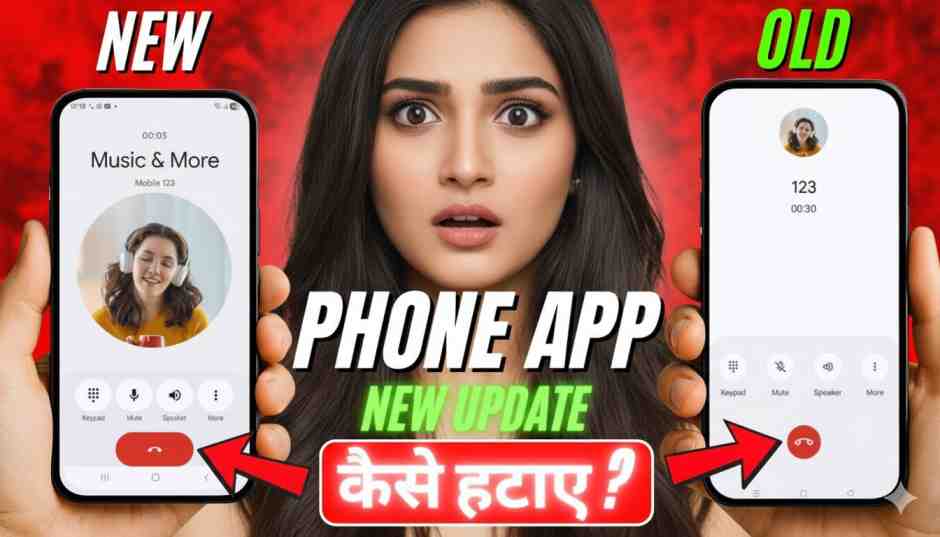
Introduction
Gujarati:
તાજેતરમાં ઘણા એન્ડ્રોઇડ યુઝર્સને ફોન/ડાયલર એપ માટે નવો અપડેટ મળ્યો છે. દરેકને નવો ડિઝાઇન ગમતો નથી, અને કેટલાક લોકોને જૂનું વર્ઝન જ ગમે છે. આ માર્ગદર્શનમાં હું તમને સ્ટેપ-બાય-સ્ટેપ બતાવીશ કે નવો ડાયલર અપડેટ કેવી રીતે અનઇન્સ્ટોલ કરવો અને જૂનું વર્ઝન પાછું મેળવવું.
“👇 નીચે Scroll કરીને બધા Screenshot જુઓ અને સંપૂર્ણ પ્રક્રિયા સમજો.”
English:
Many Android users recently received a new update for the Phone/Dialer app. The new design is not liked by everyone, and some people want to go back to the old version. In this guide, I will show you step-by-step how to uninstall the new Dialer update and restore the old version.
Option 1: Uninstall Updates from Play Store
Gujarati:
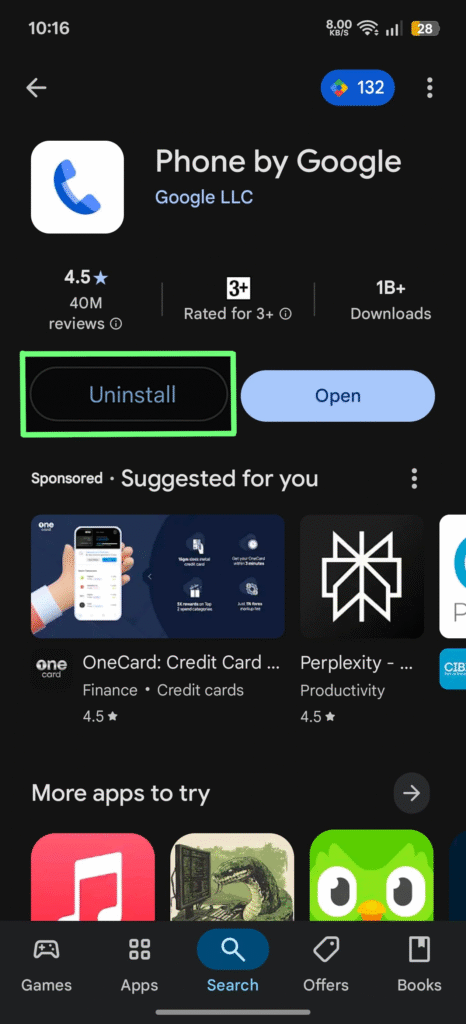
- ગૂગલ પ્લે સ્ટોર ખોલો.
- Phone by Google શોધો. Click on link 👉🏻 https://play.google.com/store/apps/details?id=com.google.android.dialer&pcampaignid=web_share
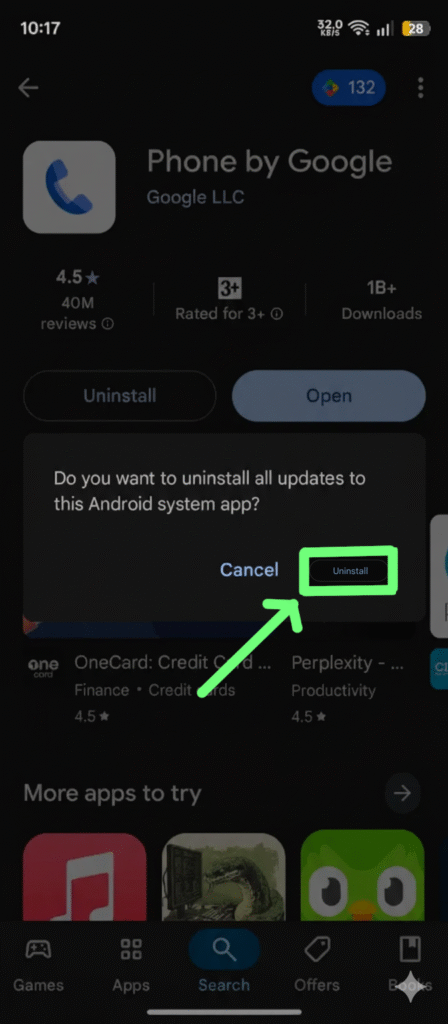
- Uninstall પર ક્લિક કરો – આથી અપડેટ દૂર થશે અને ફેક્ટરી વર્ઝન પાછું આવશે.
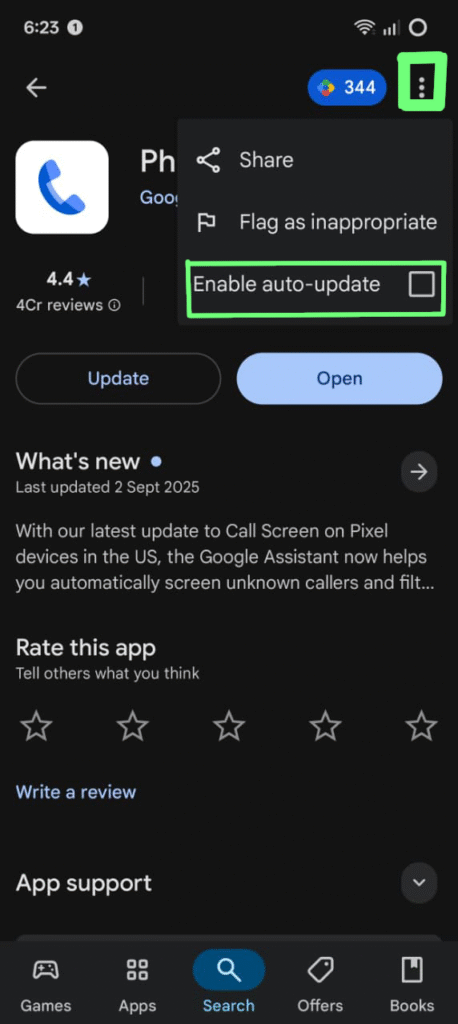
- ઉપરના ત્રણ બિંદુ (⋮) પર ટેપ કરો → Disable auto-update પસંદ કરો જેથી ફરી અપડેટ ન થાય.
English:
- Open Google Play Store.
- Search for Phone by Google. Click on link 👉🏻 https://play.google.com/store/apps/details?id=com.google.android.dialer&pcampaignid=web_share
- Tap Uninstall – this removes the updates and restores the factory version.
- Tap the 3 dots (⋮) → Disable auto-update to stop future updates.
Option 2: Uninstall Updates from System Settings
Gujarati:
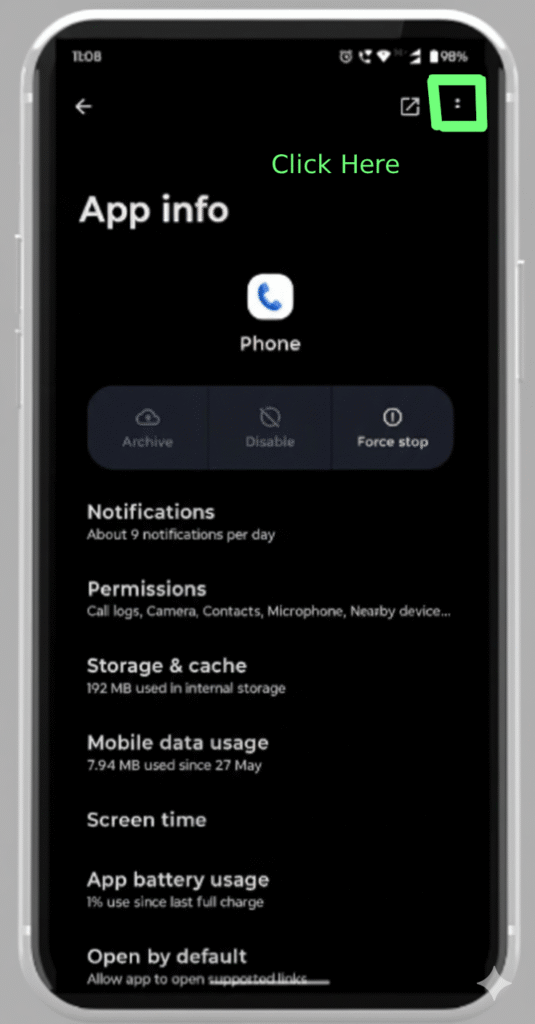
- સેટિંગ્સ → એપ્સ → મેનેજ એપ્સ માં જાઓ.
- Phone / Dialer app પસંદ કરો.
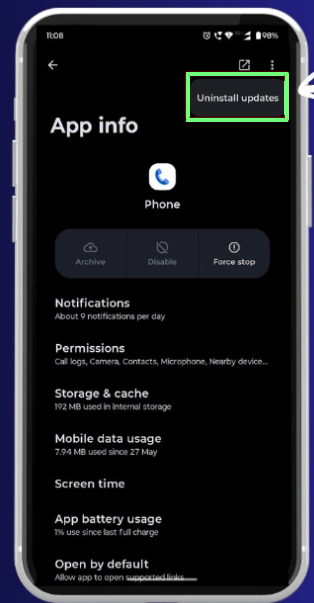
- ઉપરના ત્રણ બિંદુ (⋮) પર ટેપ કરો.
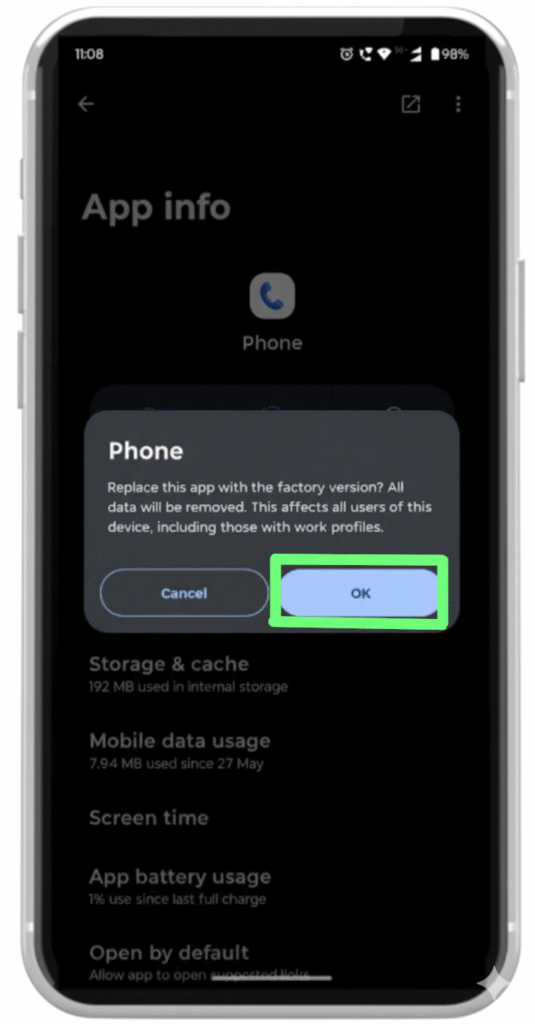
- Uninstall updates પસંદ કરો (જો ઓપ્શન દેખાતું હોય તો).
English:
- Go to Settings → Apps → Manage apps.
- Search and select Phone / Dialer app.
- Tap ⋮ (three dots) in the corner.
- Choose Uninstall updates (if available).
Option 3: Disable and Re-enable App
Gujarati:
જો Uninstall option ઉપલબ્ધ ન હોય:
- સેટિંગ્સ → એપ્સ → Phone માં જાઓ.
- Disable પર ક્લિક કરો → Confirm કરો.
- ફોન રિસ્ટાર્ટ કરો.
- પાછા Settings → Apps → Phone માં જઈ Enable કરો.
English:
If uninstall option is not available:
- Go to Settings → Apps → Phone.
- Tap Disable → Confirm.
- Restart your phone.
- Open Settings → Apps → Phone → Tap Enable.
Option 4: Install Old Version (APK)
Gujarati:
જો તમને જૂનો ડિઝાઇન કાયમી જોઈએ:
- પહેલા પ્લે સ્ટોરમાંથી અપડેટ અનઇન્સ્ટોલ કરો.
- APKMirror.com જેવી ટ્રસ્ટેડ સાઇટ પરથી Google Phone APK નું જૂનું વર્ઝન ડાઉનલોડ કરો.
- સેટિંગ્સમાં જઈ Install unknown apps ઓપ્શન Allow કરો.
- APK ઇન્સ્ટોલ કરો અને જૂનો ડાયલર વાપરો.
English:
If you want the older design permanently:
- First, uninstall updates from Play Store.
- Download an older version of Google Phone APK from trusted sites like APKMirror.com.
- Enable Install unknown apps in settings.
- Install the APK and enjoy the old dialer.
📌 Introduction: Why Users Want to Remove New Dialer Update
ગુજરાતીમાં કહીએ તો –
ઘણા યુઝર્સને નવું ડાયલર અપડેટ પસંદ નથી. જૂના સિમ્પલ ડિઝાઇનમાં ફોન કરવો કે રીસીવ કરવો સરળ લાગતું હતું. તેથી જ લોકો પાછું જૂનું વર્ઝન ચલાવવું માંગે છે.
Many smartphone users recently got a new dialer update (Phone by Google update). Some people like the new features such as caller ID announcement, spam protection, and new UI design, but many users don’t feel comfortable with the new interface.
👉 For example, the red call button shifted position, call logs look different, and some ads/music suggestions started appearing. Because of this, thousands of users are searching “How to uninstall new dialer update?”
📌 Common Issues With New Dialer Update
- Confusing UI – New design સાથે call attend/decline કરવું મુશ્કેલ લાગે છે.
- Battery Drain – કેટલાક ફોનમાં update પછી battery usage વધારે થઈ ગયું.
- Lagging Issue – Incoming call screen થોડું slow open થવા લાગ્યું.
- Extra Permissions – Update પછી વધારે permissions માગે છે.
- Ads & Suggestions – “Music & More” જેવી suggestions આવતા યુઝર્સને તકલીફ થાય છે.
👉 આ બધા કારણોને લીધે, યુઝર્સ પાછું Old Dialer App use કરવું પસંદ કરે છે.
📌 Options to Revert Back to Old Dialer
If you want to remove or stop the new dialer update, you have 3 major options:
1. Uninstall Updates (From Play Store)
- Open Play Store → Search “Phone by Google”
- Tap on Uninstall Updates
- This will roll back to your old dialer version.
2. Disable Auto Updates
- Play Store માં app page → Top right 3 dots → Uncheck Auto Update
- This prevents future unwanted updates.
3. Install Older Version (APK)
- You can download the stable old APK from trusted websites like APKMirror
- Uninstall current update → Install old APK manually.
⚠️ Note: Always download from trusted sources only to avoid security risks.
📌 Safety Tips Before Reverting Update
✔ Backup your contacts & call logs
✔ Disable auto-update after rollback
✔ Download APK only from secure sites
✔ Don’t use modded/cracked APKs
📌 Conclusion
So, if you don’t like the new dialer update, don’t worry. You have multiple methods to uninstall or roll back. The simplest way is directly from Play Store → Uninstall updates. And if you want to keep using the old version permanently, just turn off auto-update.
ગુજરાતીમાં સારાંશ –
જો નવું અપડેટ ગમતું ના હોય તો, તમે સરળતાથી Play Storeમાંથી uninstall update કરી શકો છો અને પાછું જૂનું dialer ચલાવી શકો છો.
1. Why should I uninstall the new dialer update?
👉 English: Because many users find the new UI confusing, battery draining, or lagging.
👉 Gujarati: ઘણા યુઝર્સને નવું UI મુશ્કેલ લાગે છે, બેટરી ઝડપથી ખૂટે છે કે ફોન slow થાય છે, એટલા માટે uninstall કરવા માંગે છે.
2. Can I completely delete the Google Phone app?
👉 English: No, it’s a system app on most Android phones. You can only uninstall updates or disable it.
👉 Gujarati: સંપૂર્ણ app delete કરી શકાતું નથી, કારણ કે એ system app છે. Updates uninstall અથવા disable કરી શકાય છે.
3. How do I uninstall the dialer update from Play Store?
👉 English: Open Play Store → Search “Phone by Google” → Tap Uninstall Updates.
👉 Gujarati: Play Store ખોલો → “Phone by Google” search કરો → Uninstall Updates પર ક્લિક કરો.
4. How to stop future dialer updates automatically?
👉 English: On the app page → Tap 3 dots → Uncheck Enable Auto-update.
👉 Gujarati: App page પર જાઓ → ઉપર 3 dots → Auto-update નો option uncheck કરો.
5. Is it safe to install an older version APK of the dialer?
👉 English: Yes, but only if you download from trusted sites like APKMirror.
👉 Gujarati: હા, પણ માત્ર APKMirror જેવી trusted સાઇટ પરથી ડાઉનલોડ કરશો તો જ safe છે.
6. Will uninstalling updates affect my contacts?
👉 English: No, your contacts and call logs will remain safe.
👉 Gujarati: ના, uninstall updates કરવાથી contacts કે call logs delete થતા નથી.
7. Can I reinstall the new update again if I want?
👉 English: Yes, just go to Play Store and tap Update again.
👉 Gujarati: હા, જો તમને ફરીથી નવું update જોઈએ તો Play Store માં જઈને Update પર ક્લિક કરો.
8. Why is my phone forcing the new dialer update?
👉 English: Because auto-update is enabled in Play Store. Disable it to stop.
👉 Gujarati: કારણ કે Play Store માં auto-update on છે. એને off કરશો તો update આવતું બંધ થઈ જશે.
9. Which is better – Old dialer or New dialer?
👉 English: It depends. Old dialer is simple and fast. New dialer has spam protection and extra features.
👉 Gujarati: એ તમારા use પર આધારિત છે. જૂનું dialer simple અને fast છે, જ્યારે નવું dialer spam protection અને extra features આપે છે.
10. Can I use third-party dialer apps instead?
👉 English: Yes, apps like Truecaller Dialer or Drupe are available.
👉 Gujarati: હા, તમે Truecaller Dialer અથવા Drupe જેવી third-party apps use કરી શકો છો.